

For a creative mind, ideas are constant. Without a central place to land, those ideas often turn into mental clutter. For those of us living with ADHD, a system is not just a preference: it is a necessity. I use a digital OneNote notebook to capture the many areas of my life and turn chaos into a calm, visual map.
Why OneNote Works for the Creative Brain
OneNote functions like a digital binder. It allows for a non-linear approach to organization that feels natural for creative professionals.
The Browser Extension: You can clip articles, images, and snippets directly from the web. This prevents the "tab graveyard" and keeps your research in context.
Multimedia Flexibility: You can mix text, photos, and links on a single page. It feels less like a document and more like a scrapbook.
Sync Across Devices: Having your "brain" on your phone and your desktop ensures you never lose a fleeting thought.
The Nine Pillars of My Organization
I divide my life into specific categories. This helps me find exactly what I need without digging through a single, giant list.
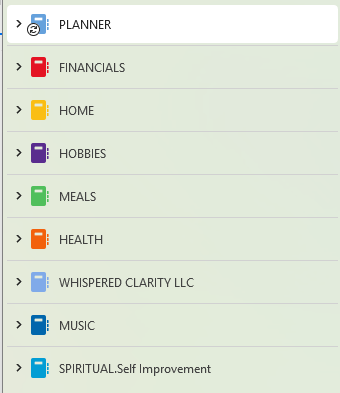
Planner: This is the home for daily rhythms, weekly overviews, and seasonal goals.
Financials: I keep budgets, tax records, and receipts here. It provides a clear view of my financial health.
Home & Lifestyle: This section covers household maintenance, décor inspiration, and family logistics.
Hobbies & Projects: A dedicated space for the "just for fun" ideas that keep my creativity alive.
Meals: This is a living cookbook of favorite recipes and a weekly meal planning hub.
Health: I track wellness goals, appointment notes, and medical history here.
Business: This holds my professional strategies, client workflows, and brand assets.
Music: As a musician, I need a place for song ideas, practice logs, and technical notes.
Spiritual & Self Improvement: A quiet space for reflections, study notes, and personal growth goals.
The Power of Visual Cues: Color Coding
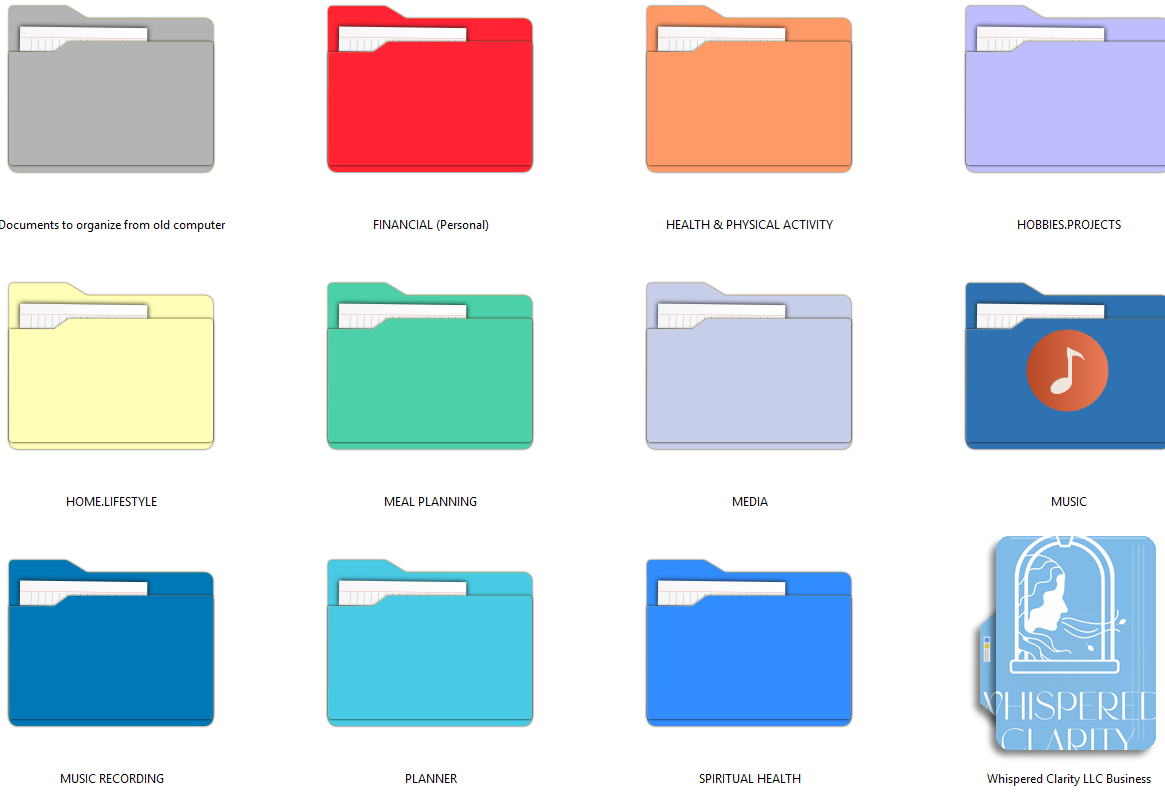
As someone with ADHD, visual cues are a vital part of my focus strategy. I use a consistent color-coding system that spans my entire digital environment.
For example, my Financials category is always red. The folder in OneNote is red. My desktop folder is red. My browser tabs for banking are red. In my calendar, every due date or financial reminder is also red. This creates an immediate mental association. When I see red, my brain knows exactly what "mode" I am in. This reduces decision fatigue and keeps me on track without extra effort.
Systems Create Space
Organization is not about being "perfect." It is about creating a supportive structure so you can focus on the work only you can do. When you move the details of your life into a reliable system, you create the mental room needed for true creativity and peace.
Key Takeaways
Centralize Your Search: Use one tool like OneNote to avoid losing information across different apps.
Use Visual Anchors: Color coding provides immediate clarity for your brain.
Categorize by Life Area: Breaking your world into "pillars" makes management feel less overwhelming.
Related Reading
Take the Next Step
Ready to clear the clutter and find your focus?
Subscribe: Sign up for our newsletter for more tips on digital organization and creative ease.
Contact: Let’s discuss how to build a bespoke system that supports your unique brain.
Follow: Find us on Instagram for more looks inside my personal life organization 🌬️🍃🌸