

Your Inbox Has One Clear, Simple, and Beautiful Job: And it was never meant to be a filing cabinet

Your email inbox is a temporary space for communication and tasks, not a place for permanent storage. Once you truly internalize that, everything about how you manage email changes. This is the foundation of the inbox organization system I now use for myself and some of my clients at Whispered Clarity LLC, where I design operational systems for creative entrepreneurs and small business owners.
But getting here? That took me a while.
I have ADHD. And if you do too, or if your brain just works in that scattered, everything-feels-equally-urgent kind of way, then you already know what a chaotic inbox does to you. It’s not just messy. It’s paralyzing. I would open my email, see a wall of unread messages spanning every area of my life — finances, health appointments, business inquiries, and a newsletter I never unsubscribed from all jumbled together with no clear starting point. And instead of tackling it, I’d close the tab. I’d tell myself I’d deal with it later. And “later” kept getting pushed until the pile felt so overwhelming that starting felt impossible.
For a long time, I avoided cleaning up my inbox altogether. Not because I didn’t care, but because I genuinely didn’t know where to begin. With ADHD, the mental load of sorting through unstructured information can trigger a kind of cognitive freeze. Your brain craves order and clear categories, but when none exist, it just… stalls.
What finally shifted things wasn’t willpower or a productivity hack. It was building a system that worked with the way my brain actually operates.
Your inbox isn’t the problem. The lack of structure is. And structure, it turns out, is something you can design.
Why scattered inboxes are especially hard on ADHD brains
Here’s what nobody tells you about ADHD and email: the problem isn’t the number of messages. It’s the randomness. When your inbox is a mixed stream of completely unrelated topics — a bill, a recipe, a client follow-up, a doctor’s reminder — your brain has to context-switch with every single email. For a neurotypical brain, that’s mildly inefficient. For an ADHD brain, it’s exhausting and often overwhelming enough to cause avoidance altogether.
The ADHD brain thrives on grouping like things with like things. It needs visual cues, clear categories, and a sense of “I know exactly where to look for this.” It needs to be able to focus on one type of task at a time rather than bouncing between completely different contexts every thirty seconds.
Decision fatigue is also a real factor. Every email in a disorganized inbox forces a micro-decision: what is this, where does it belong, what do I do with it, is it urgent? Multiply that by fifty unread messages and your brain is done before you’ve even started your actual work. A well-structured email management system eliminates most of those micro-decisions before you even open your inbox.
How I rebuilt my email inbox organization system from scratch
So I scrapped everything and started fresh. Instead of a tangled mess of topic-specific folders, I recreated my OneNote nine color-coded category folders that mirror the main areas of my life. The color-coding isn’t decorative for an ADHD brain. Visual differentiation is genuinely functional. Your eye goes straight to the category you need without having to read and process a list of text labels.
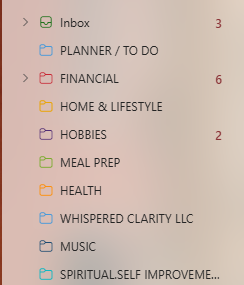
Then I set up automatic sorting rules so emails file themselves before I ever see them. Financial emails go straight to the red Financials folder. Health-related messages route to orange Health. Business correspondence files into Business automatically. By the time I open my inbox, the sorting is already done — no decisions required, no scattered mixed feed to wade through.
Now when I check my email, I open one colored folder at a time. I’m in financial mode, then health mode, then business mode — focused, contained, and clear. That “like with like” structure is exactly what an ADHD brain needs to stay oriented and avoid the spiral of context-switching that makes email feel so overwhelming.
The rule: every email needs a decision
Here’s the part that keeps the system clean long-term, and it’s also the part that helps most with ADHD-related avoidance. No email is allowed to live in a folder indefinitely without a clear status. Because ambiguity is where ADHD avoidance lives. When an email has no defined next step, your brain treats it as an open loop. And open loops accumulate into dread.
So every email gets one of three outcomes:
📄 Save as PDF
Export and file in your digital folder system for documentation or future reference.
🗑 Delete
It served its purpose. Let it go. You don't need it again.
📦 Archive
Keep it searchable without cluttering active folders.
The only exception is an email that represents a task still in progress, such as an appointment coming up or a project actively underway. That stays in its folder as a visible, intentional to-do. But the moment that task is complete, it moves on. Closed loops. Clear inbox. Calmer brain.
Why saving emails as PDFs beats keeping them in folders
This is the piece most people skip, and it’s one of the most powerful parts of any organized email system. When I need to save an email for documentation such as a receipt, a contract confirmation, a health summary, or a business correspondence thread, I save it as a PDF and file it in the corresponding category in my computer’s digital folder system.
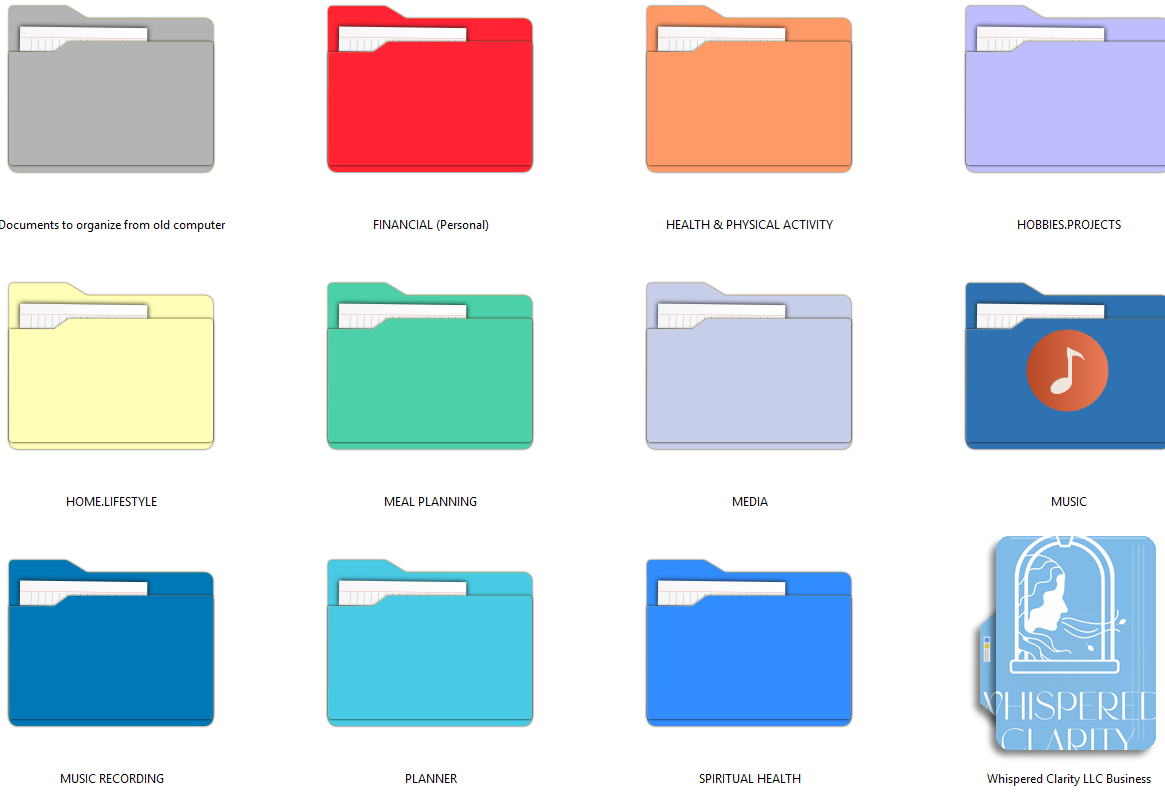
Your computer’s folder structure can be as detailed and nuanced as you need it to be with subcategories for taxes, receipts, invoices, and more, without any of that complexity cluttering your inbox. The inbox stays simple and functional. The depth lives on your computer, where it belongs. Two systems, each doing exactly one job. That kind of clear separation is especially helpful for ADHD brains that struggle when everything is in one place trying to serve too many purposes at once.
What a well-designed inbox system actually feels like
I open my email once or twice a day now. I move through each colored folder, address what needs addressing, and route everything that’s done to its next destination: saved, deleted, or archived. There’s no freeze. No dread. No avoidance spiral. Just a clear, structured surface I can work across with intention.
If your inbox has felt like a source of anxiety rather than a tool, especially if your brain has ever just shut down at the sight of it, I want you to know it’s not a you problem. It’s a systems problem. And systems can be designed.
Clarity begins at the inbox. And it’s simpler than you think.
Ready for an inbox that’s clear, simple, and beautiful?
Take the Next Step
I set this up for my clients so they don’t have to figure it out alone. From color-coded folder structure and automatic sorting rules to a PDF filing system built for the way your brain actually works — I’ll design and build it with you, bespoke to your life. You just show up and create.
Subscribe: Join the newsletter for seasonal insights on history and order.
Contact: Reach out to discuss building a system for your unique mission.
Follow: Find us on Instagram for more on operational artistry for creative entrepreneurs.
Frequently Asked Questions
Is this inbox system good for people with ADHD?
Yes — this system was designed with ADHD brains in mind. Color-coded categories provide visual clarity so you don’t have to read and process a list of text labels. Automatic sorting rules make decisions before you even open your inbox, eliminating the decision fatigue that leads to avoidance. And the “like with like” folder structure means you can process one area of your life at a time — no context-switching, no overwhelm, no freeze.
What should I do with an email after I read it?
Every email needs one of three actions: save it as a PDF and file it in your computer’s digital folder system, delete it if you no longer need it, or archive it if you might need to search for it later. The only reason an email should stay in your inbox folder is if the task it represents is still in progress.
What is the difference between archiving and deleting an email?
Deleting removes the email permanently. Archiving moves it out of your active folders but keeps it searchable — useful for emails you don’t need to act on but might want to reference later. When in doubt, archive. You can always delete later, but you can’t easily recover a permanently deleted email.
Why save emails as PDFs instead of keeping them in email folders?
Email clients aren’t built for long-term document storage — they’re built for communication. Saving important emails as PDFs and filing them in your computer’s folder system gives you a more organized, reliable, and searchable archive that doesn’t clutter your inbox or depend on your email provider’s storage limits.
How do I set up automatic email sorting rules?
Most email clients — including Gmail, Outlook, and Apple Mail — have a rules or filters feature that lets you automatically route incoming emails based on sender, subject line, or keywords. For example, you can set a rule so that any email from your bank goes directly to your Financials folder, or any email with “invoice” in the subject routes to Business.
How many email folders should I have?
Fewer than you think. The goal of inbox folders is broad categorization — routing emails to the right area so you can address them in focused batches. The detailed subcategories belong in your computer’s digital folder system, not your inbox. A clean inbox organization system typically uses between five and ten top-level category folders.
Can someone set up this email system for me?
Yes — this is exactly the kind of work I do at Whispered Clarity LLC. I design and build bespoke inbox organization systems and digital filing structures for creative entrepreneurs and small business owners, tailored to how you actually live and work. If you’re ready for an inbox that’s clear, simple, and beautiful, I’d love to help.